Pin-Based Review for Video: Frame-Accurate Feedback Without the Spreadsheet
 Koha Team•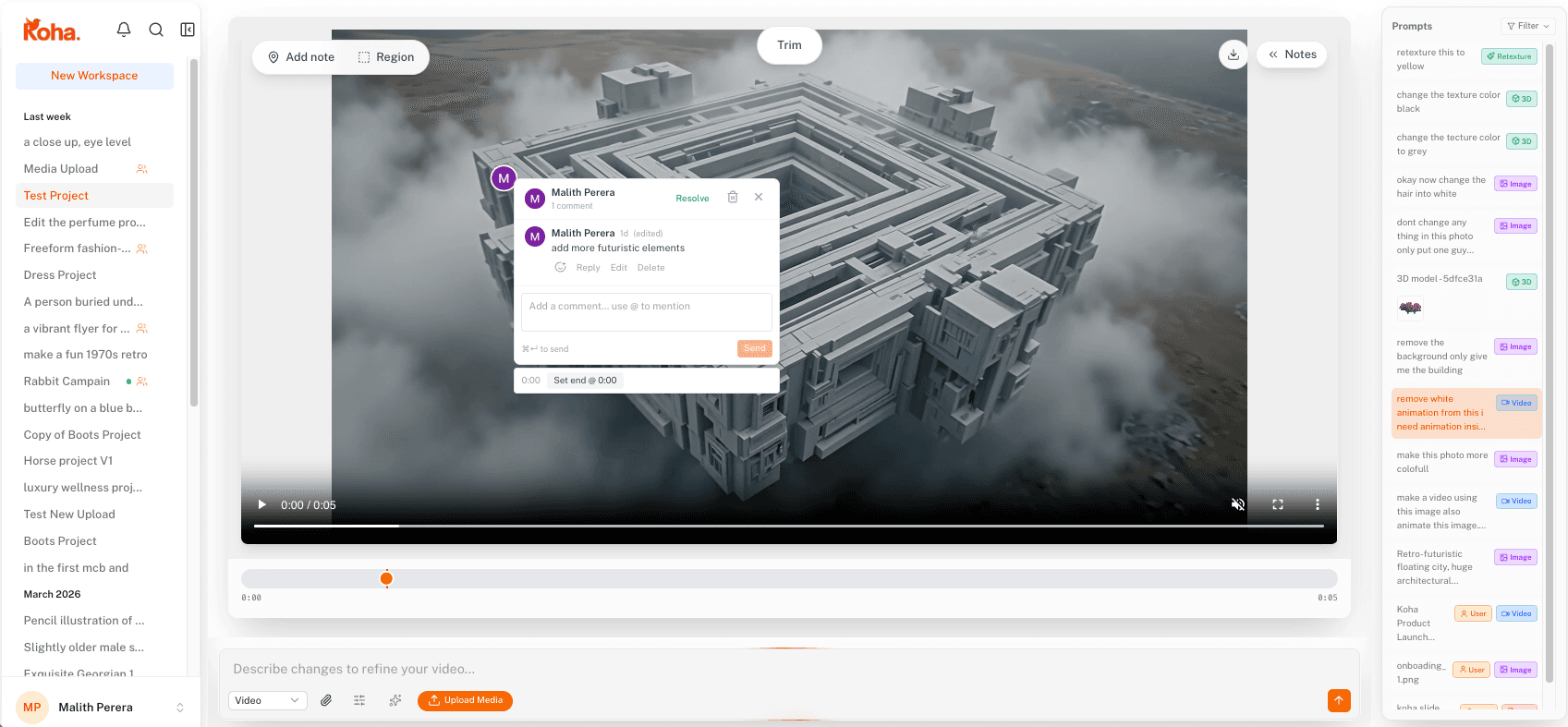
Pin-based review for video replaces the timestamp spreadsheet with a single click. Tap the player on the exact frame you mean, type the note, and the comment is locked to that frame and that pixel forever. No more “at around 0:42, near the title card, the thing in the background.” The editor opens the comment and the player jumps straight to the moment.
In Koha, every video pin is locked to two things at once: a point on the frame and an exact timestamp. Click on the player, type your note, and the comment lives at that pixel at that millisecond. The editor opens the comment, the player jumps to the frame, and there's nothing to translate.
Frame, not “around 0:42”
The unit of feedback in video should be the frame. That's how editors think and that's where the work actually happens. Most review tools collapse this into a timestamp at second-level precision, which is fine for podcasts and useless for cuts.
A pin in Koha pins to the frame you were on. Snap to a single beat of motion, the moment a logo lands, the frame where the lighting flickers. The reviewer doesn't have to describe what's on screen because the editor will land on the same exact frame when they open the comment.
Pins go inside the frame, not just on the timeline
This is the part most video review tools miss. They let you mark a moment in time and stop there. Koha lets you drop the pin inside the frame itself, on the exact pixel you're talking about. So instead of a comment that says “at 0:42, the lower-third is too bright,” the pin sits in the lower-left corner of frame 1008 and the note just says “too bright.”
Video has two dimensions of where: when, and where on screen. Koha pins handle both at once. The reviewer clicks the spot, the location and the timestamp are both captured, and the comment lives there for everyone who opens the file later.
When the pin sits on the actual region, comments shrink. “Too bright.” “Wrong font.” “Hold longer.” The location does the explaining. This is the same effect pin-based review has on images, just with a time axis on top.
Motion notes are easier to give and easier to act on
Some video feedback is about a single frame. Plenty of it is about a range: this whole transition, this entire shot, the tail of this fade. Pins can carry a duration, so a reviewer can mark a span (from this frame to that one) and leave one comment on the entire passage.
That's how editors think about cuts internally. The review tool finally matches the unit of work, instead of forcing reviewers to leave three pins or write a paragraph that says “from when the music drops until the cut to wide.”
Everything stays in the workspace
When a clip is generated or edited inside Koha, the pins live next to the file in the same workspace. Re-prompt the video, drop in a new cut, swap the colors, and the review history stays attached to the project, not stranded in an external tool.
For teams running structured rounds, this changes the cadence. Reviewers leave pins, the editor resolves them, the timeline of decisions is right there next to the player. The review process we run with clientsworks because feedback never leaves the file it's about.
Try a single pin on the next cut you ship for review and see how the comment ends up two words instead of two sentences. That's the whole pitch.