How We Run a Creative Review Process With Clients
 Koha Team•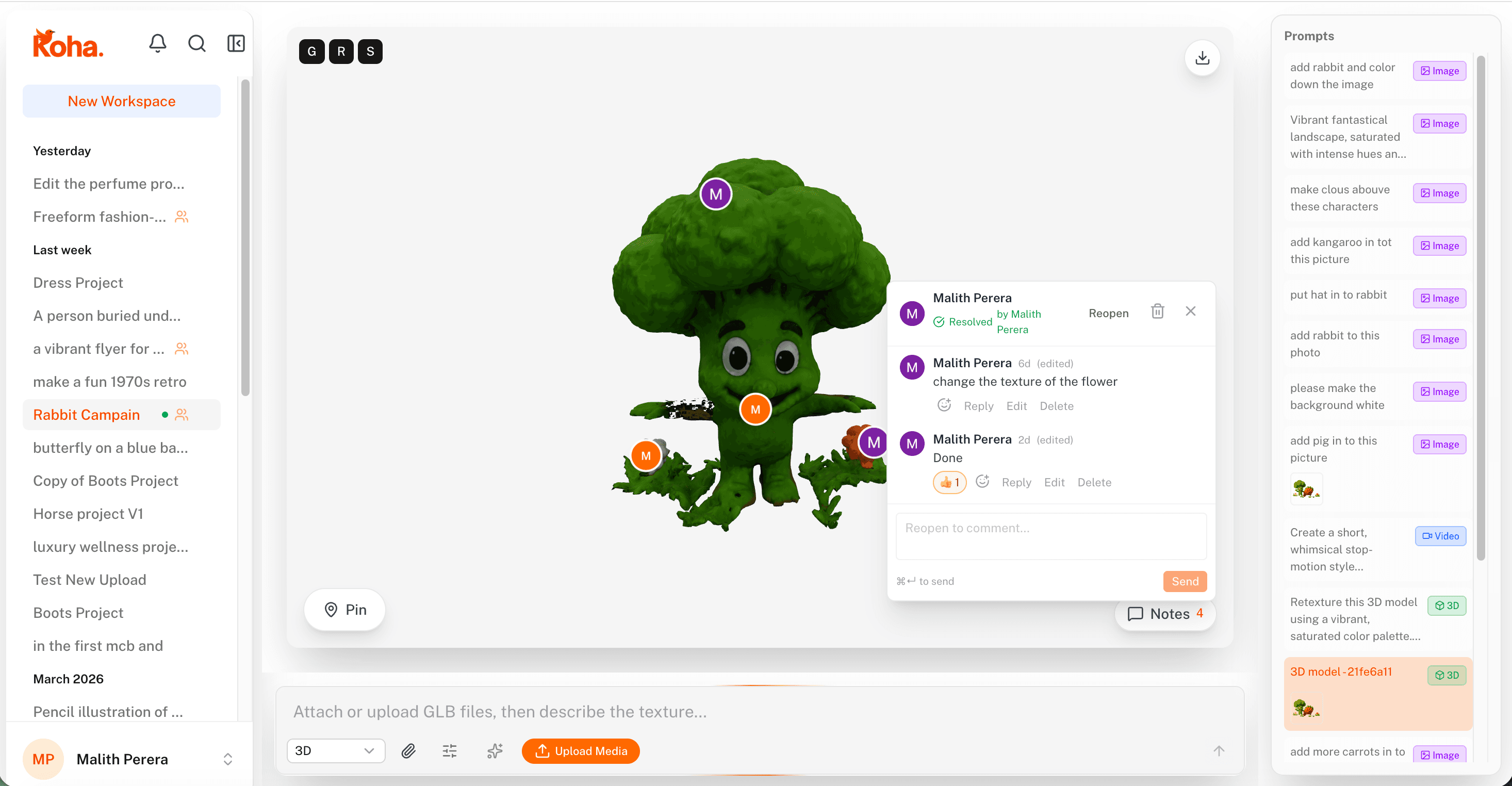
In-context pins keep client feedback attached to the exact part of the work it’s about.
Most creative work doesn’t get stuck in the making. It gets stuck in the reviewing. A draft goes out on Tuesday, the client replies Friday with a paragraph about “the second image, the one near the top, can we make it pop more?”, and a week later you’re still trying to figure out which image and what “pop” means.
We’ve been on both sides of that loop, so when we set up our own creative review process with clients, we wrote down the things that actually keep it moving. Here’s how we run it.
One workspace, everyone in it
Before any creative work goes out for review, we set up a shared workspace for the project. The client, our designers, the project managers, anyone who needs to weigh in: they all live in the same place from day one.
That sounds basic, but it solves three things at once:
- Every version of every asset is in one spot, not scattered across email and Drive links
- New team members can be added without re-sending months of context
- Feedback lands where the work is, instead of in a separate thread that nobody reads twice
We keep the workspace scoped to the project. Roles and permissions decide who can edit, who can comment, and who can approve. Clients usually sit in the comment-and-approve lane, which is exactly where they want to be.
Share work in context, not as attachments
When a piece is ready for review, we don’t email a PDF or a download link. The asset, image, video, or 3D model, opens directly in the workspace, full quality, and the client reviews it where it lives.
That one change kills a surprising amount of friction:
- No version mismatches between what we sent and what they’re looking at
- No “can you re-send the latest one?” the day before launch
- No screenshots-of-screenshots in reply emails
Pin the feedback to the thing
This is the part that changes everything. Instead of writing “the headline feels off,” the client drops a pin on the headline and types into a thread that lives right there. On a video, the pin is bound to a frame. On a 3D model, the pin sticks to the surface even as you rotate it.
The result is feedback that explains itself:
- You always know which element the comment is about
- Threaded replies keep the back-and-forth in one place
- Real time collaboration means the designer can respond while the client is still looking at it
- Nothing gets lost in the gap between the work and the words
We tell new clients: don’t describe what you mean, point at it. The faster they get into the habit, the faster the project ships.
Statuses do the project management for you
Every asset and every comment thread carries a status. We use four:
- Open — feedback is in, no one’s acted on it yet
- In review — a designer is working on the change
- Approved — the client has signed off, it’s done
- Rejected — explicitly killed, with the reason in the thread
When everything is statused, you don’t need a separate spreadsheet to track the review and approval process. Project managers can open the workspace and see, at a glance, what’s blocked, what’s waiting on the client, and what’s ready to ship.
It also gives the client confidence. They can see their own approvals stack up, which is a much better feeling than wondering whether anyone read their email.
Sign-off is a click, not a meeting
When all the threads on an asset are resolved and it’s marked approved, that isthe sign-off. There’s a timestamped record of who approved what and when, attached to the version they actually saw. No follow-up email, no “just confirming on the call,” no separate change log.
For us this matters most when something comes back later: “wait, why does the hero say this?” We can pull up the exact version that was approved, the thread that led to it, and the person who clicked the button. Awkward conversations get a lot shorter.
Small habits that keep it smooth
The tools handle most of the heavy lifting, but a few habits make the difference between a tidy review cycle and a messy one:
- Set the round expectations early. “Two rounds of revisions, then one final polish” is a much better starting point than open-ended feedback.
- Ask clients to consolidate feedback. One review session beats six dribbled-in comments over three days.
- Resolve threads as you go. An open pin should always mean “there’s still something to do here.”
- Use @mentions sparingly. Notifications are powerful when they’re rare.
- Always link to a version, not “the latest.” Versions are cheap, ambiguity isn’t.
Why it beats the email-and-PDF version
The old way of running a creative review process, attachments flying around, comments in three different threads, sign-off buried in someone’s inbox, treats creative work like paperwork. It isn’t. It’s visual, contextual, and collaborative, and the process around it should match.
When the work, the feedback, and the approvals all live in the same workspace, the loop tightens. Designers spend less time decoding comments, clients spend less time describing what they mean, and project managers spend less time chasing status. The whole creative workflow speeds up because nothing falls between the cracks.
Share the work. Pin the feedback. Approve in context.
That’s the whole loop. Everything else is just keeping it tidy.
Try it on your next project
If your current review process lives in email threads, Slack DMs, and a folder full of final_v3_FINAL.pdf files, this is exactly the kind of thing Koha was built to fix. Pull a project into a workspace, invite your client, and run one round the new way.
The first project usually feels strange. By the second, the team wonders how they ever did it the other way.