Pin-Based Review for 3D: Comments That Stick to the Mesh
 Koha Team•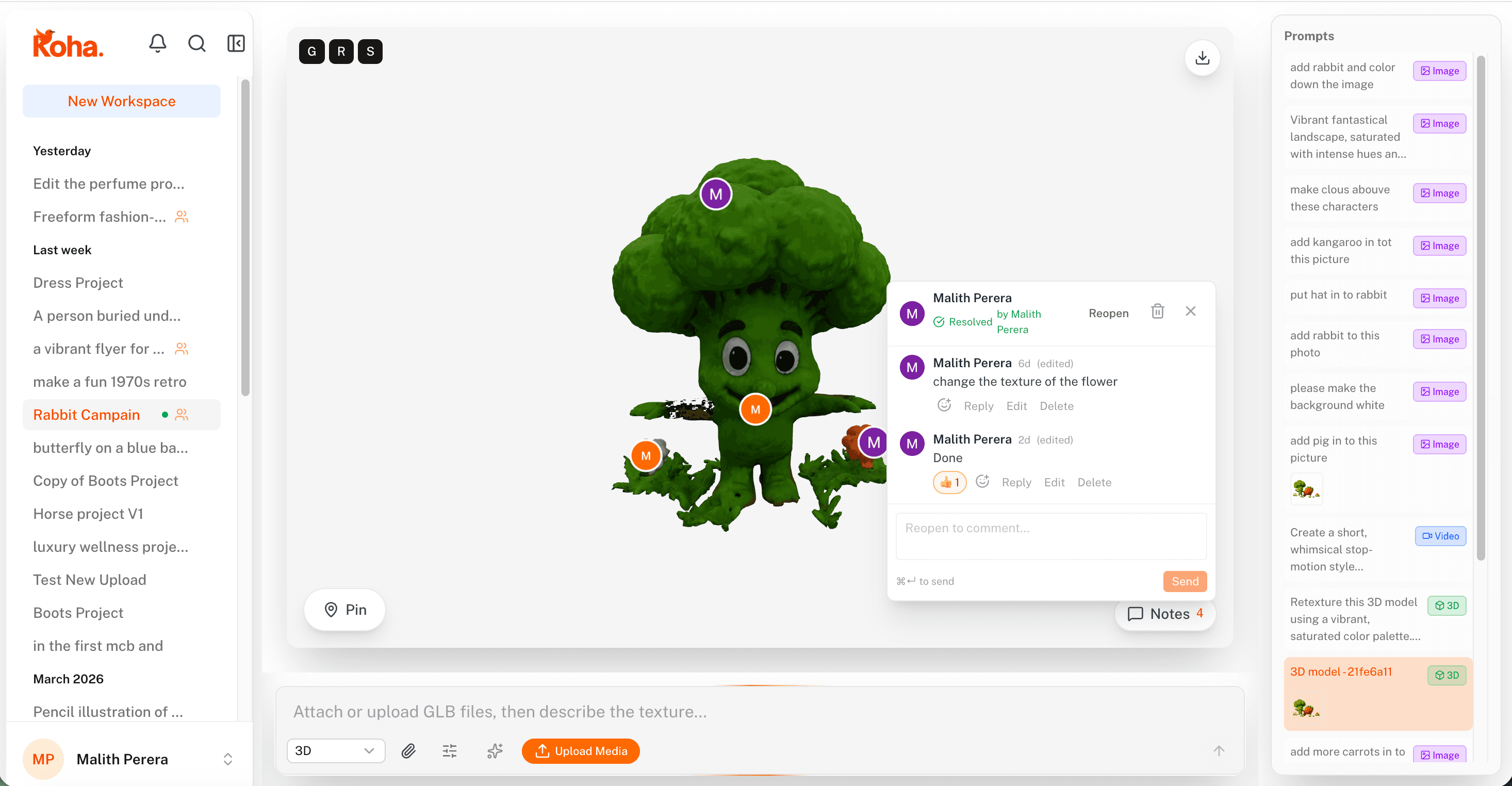
Pin-based review for 3D solves the one thing screenshots can't: the model moves. Drop a pin on a corner, a seam, or that weird bump on the back, then rotate or zoom. The pin stays locked to the same point on the mesh, so the comment is always pointing at the surface it's about, from any angle a reviewer chooses to look at.
In Koha, a 3D pin is anchored to the mesh itself, not to the camera. Drop a pin on a corner, a seam, or that weird bump on the back, then rotate, zoom, or relight. The pin stays attached to the same point on the geometry. Anyone who opens the comment lands looking at the same surface, from any angle they want.
The pin sticks to the surface
This is the entire feature in one sentence, and it's the part that makes everything else work. Once a pin is mesh-anchored, the reviewer doesn't have to describe location at all. No “the spot near the handle on the left side when you face it the way the screenshot showed.” The pin is on the handle. Open it, the camera frames it.
For complex models, this saves rounds of clarification. Reviewers stop avoiding 3D feedback because it's annoying to describe and start leaving the notes they actually want to leave.
Surface notes vs. geometry notes
3D review usually mixes two very different kinds of feedback. Surface notes (“this material looks plastic,” “color is off here”) and geometry notes (“this edge is too sharp,” “the proportions feel wrong”). Pins handle both because they're attached to a point in space, and from there reviewers can write whatever they want.
The artist sees both kinds of notes overlaid on the same model and can decide what to address in which pass. Material changes? Re-prompt the texture. Geometry changes? Sculpt or regenerate. The pin doesn't care which lane the feedback belongs to.
Inspect, don't imagine
The other half of 3D review is being able to see what the reviewer saw. With a pin-based view, every reviewer is looking at the same model in the same browser. They can rotate, zoom in close, change the lighting if they want. Nobody is reviewing a flattened 2D screenshot of a 3D thing.
That sounds obvious until you realize how much 3D feedback historically gets blocked by “send me a different angle.” That round trip kills momentum. Live model + pinned comments removes the loop entirely.
Same workspace as generation and editing
When a 3D model is generated or retextured in Koha, the pins live in the same workspace. Re-prompt the material, regenerate a part, swap the lighting, and the review history stays attached. If you want a sense of how fast the generation side moves, the 3D generation walkthrough covers it.
The point is the loop closes inside one tool. Generate, review, fix, re-review. No exporting to a separate viewer, no zipping turntables for Slack, no asking someone to “send a 3/4 from the other side.”
Mesh-anchored pins are one of those features that sound minor on a feature list and change the whole experience the second you use one. Drop a single pin on the next 3D model you review.